
Pixel-art UnDetail
Bring over-detailed PNG assets down to a coarser pixel structure on purpose — no gray fringes, edge artifacts, or RGBA mush.
Summary
Pixel-art UnDetail reduces over-fine PNG assets down to a coarser pixel structure on purpose — block-wise downscaling and nearest-neighbor upscaling, output at the original size by default. It deliberately avoids gray fringes, semi-transparent edge artifacts and RGBA-average mush. It's a standalone transformation operation, separate from the chroma-key flow.
When to use it
- A generator/paintover asset is too fine for your pixel-art game and should look coarser.
- The usual workaround "downscale + nearest-neighbor upscaling" gives you gray edges or semi-transparent mush — UnDetail separates alpha, edge colors and block colors cleanly.
- You want to keep the original size but lower the level of detail.
When not UnDetail:
- You want real pixel art with a curated palette → Pixelize.
- You want to cut out → a chroma-key profile.
How it works
UnDetail splits the image into blocks, picks one color per block, and reassembles the result back to the original size. What's decisive for clean results:
- RGB is sampled only from opaque / sufficiently covered pixels — transparent edges bring no foreign colors or pseudo-alpha into the output.
- Exactly single-colored blocks bypass quantization and keep their original color.
- Smooth-area snap snaps optically smooth low-variance blocks onto shared area colors, so even surfaces don't go noisy block by block.
- Smooth-island cleanup adjusts tiny color outliers to the neighboring areas.
Settings
| Slider | Effect |
|---|---|
| Profile | Custom (default) · Pixelart Smooth 8 · Pixelart Strong Smooth 16 — tuned parameter bundles. |
| Block size | 2/3/4/6/8, default 4 — how coarse the pixel structure gets. |
| Sampling | Block color via Dominant (default) · Median · Average. |
| Quantization | Color grid Off · Light (default, 16 levels) · Strong (32 levels). |
| Smooth-area | Snap (default) / Off, threshold 0–32 (default 8) — unify smooth areas. |
| Smooth-island cleanup | On (default) / Off — align small color islands to neighboring areas. |
| Alpha | Hard (default) · Coverage threshold · Keep alpha, threshold default 128. |
| Edge bleed | Fill RGB under transparent edge pixels (default on) — prevents gray fringes. |
| Output size | Original size (default) · Small image (32/64/128/256 or manual 8–4096) · Both. |
Recommended settings by use case:
| Goal | Recommendation |
|---|---|
| Light coarsening, keep the original | Default (Custom, Block 4, Quantization Light) |
| Even areas, less noise | Pixelart Smooth 8 or Strong Smooth 16 |
| Also export a small sprite | Output size: Both, pick a target width |
CLI / Automation
Headless, the same coarsening — invocation and positional arguments in the CLI overview. You
pick this operation with --operation undetail.
Relevant flags (mirroring the sliders above): --undetail-profile {custom,balanced,strong_smooth},
--undetail-block-size {2,3,4,6,8} (Block size, default 4), --undetail-sampling {dominant,median,average},
--undetail-quantization {off,light,strong}, --undetail-smooth-mode {off,snap} with
--undetail-smooth-threshold 0–32, --undetail-island-cleanup {off,on},
--undetail-alpha-mode {hard,coverage,preserve} with --undetail-alpha-threshold 1–255,
--undetail-bleed-edge-rgb {on,off} (Edge bleed) plus the output size
--undetail-output-scale {original,small,both} with --undetail-small-width PX.
Example:
clean_sprite_chromakey.py art.png art_undetail.png --operation undetail --undetail-block-size 4 --undetail-quantization light
FAQ
What's the difference from "Pixelize"? UnDetail is a block mosaic + per-channel posterize — it reduces detail but produces no coherent palette and knows no target resolution. Pixelize is the pixel-art converter with a curated, limited palette and a real low-resolution grid. Pick UnDetail for coarsening, Pixelize for intentional pixel art.
Do I get semi-transparent edges? In the standard mode no — transparent pixels keep alpha 0, and the edge bleed fills sensible RGB values under the edge. So no gray fringes form.
Does this scale my chroma-key result? No. UnDetail is its own operation; chroma-key itself still never scales. The defaults of the two flows aren't mixed.
Limits
- No curated palette / no target resolution — that's Pixelize's job.
- No sprite generation, no general retouching or style-transfer function.
- No cloud / third-party services — everything runs locally.
Examples
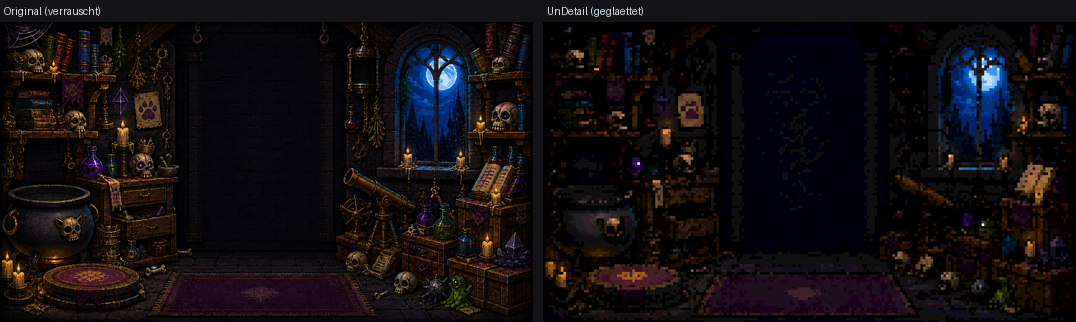
An over-drawn/noisy source is simplified block by block — calmer areas, clearer pixel art.
Related features
- Pixelize (pixel-art converter) — real pixel art with a curated palette, the distinct sister operation.