
FX / Glow (Soft Matte)
Cleanly cut out translucent glowing effects — glow, smoke, sparks, energy — with soft alpha instead of a hard 0/255 cut.
Summary
FX / Glow (Soft Matte) cleanly cuts out translucent, glowing effect assets (glow, smoke, sparks, energy) from any chroma key — green, magenta, or custom. Instead of a hard 0/255 cut it produces a soft, fractional alpha and an area-wide despill, so soft wisps and halos are preserved and no key tint is left behind as color dirt.
When to use it
- Your asset is a translucent effect with soft transitions — the hard Sprite profiles cut off your sparks/wisps and leave a fringe.
- The key tint (green/magenta cast) stays in the see-through areas as color mush with normal profiles.
- You're working with mixed keys (green and magenta) and want a profile that measures both.
When not FX / Glow:
- You need crisp, hard pixel-art edges → a Sprite profile (Green Sprite / Magenta Sprite). FX deliberately does not guess Sprite-vs-FX.
- You have a classic, opaque green screen → Green Sprite.
How it works
FX / Glow is key-agnostic and measures the key color from the image border (median of the saturated edge pixels). The thresholds scale to the real key difference — which works robustly even when the key fills 95% of the image (no percentile anchor that tips over).
From that measurement comes a soft chroma matte: the alpha is fractional
(alpha = clip((t_bg − diff)/(t_bg − t_fg), 0, 1)), the thresholds are key-relative. An area-wide
despill pulls the key tint out of the see-through areas (not just in the edge band), and an optional
Color recovery (unmultiply) makes the glow stronger again.
Settings
| Slider | Effect |
|---|---|
| Matte mode | Soft (Glow) (default) keeps fractional alpha; Hard (0/255) thresholds at 0.5 — the despill stays active. |
| Matte hardness | Key-relative background threshold. Default 82 (range 60–95). |
| Soft band | How far below the key the foreground anchor sits. Default 10 (range 0–60). |
| Despill strength | Off · Soft · Normal (default) · Strong — removes the key tint from the foreground colors. |
| Color recovery | Unmultiply for a stronger glow. Default on (--no-fx-recover turns it off). |
The defaults nail the hard cases out of the box (Normal despill / hardness 82 / Soft band 10 / recovery on / soft) — validated across 13 real assets.
Recommended settings by use case:
| Asset type | Recommendation |
|---|---|
| Glow/smoke/sparks, soft wisps | Default (Soft, Despill Normal) |
| Strong key tint in the area | Despill Strong |
| Glow looks pale | Color recovery on (default) |
| Effect with a clearly defined edge wanted | Hard (0/255) (despill stays active) |
CLI / Automation
Headless, you cut out the same way (soft matte) — invocation and shared flags in the CLI
overview. You pick this profile with --profile fx_glow; the key is measured from the image
border (no --key-color).
Relevant flags (mirroring the sliders above): --fx-matte-mode {soft,hard}, --fx-hardness 60–95
(Matte hardness, default 82), --fx-softband 0–60 (Soft band, default 10), --fx-despill {off,max,mean,min}
(Despill strength) and --fx-recover / --no-fx-recover (Color recovery, default on).
Example:
clean_sprite_chromakey.py glow.png glow_out.png --profile fx_glow
FAQ
Do I have to pick the key color with the eyedropper? No — FX / Glow measures the key from the image border. A manual key override with the eyedropper is deliberately not provided for this profile.
How does FX / Glow relate to the "Auto" profile? Auto measures the key per image and applies the same soft matte — ideal for mixed green/magenta batch folders; images with no key it passes through unchanged. Auto does not guess Sprite-vs-FX (shown by a measurement run to be unreliably separable) — for hard pixel-art edges you pick a Sprite profile yourself.
My magenta background wasn't removed at all before. Older Magenta profiles silently removed 0 pixels when the key didn't touch the image border. A global magenta fallback now keys the background even then — deliberately conservative, so enclosed magenta details of normal sprites stay protected.
Limits
- Doesn't guess Sprite-vs-FX — crisp pixel-art edges stay a manual Sprite choice.
- No manual key override (eyedropper) for FX — the key is measured.
- No denoise floor for the finest residual noise and no edge trim for the ~1 px bright image fringe of some assets.
Examples
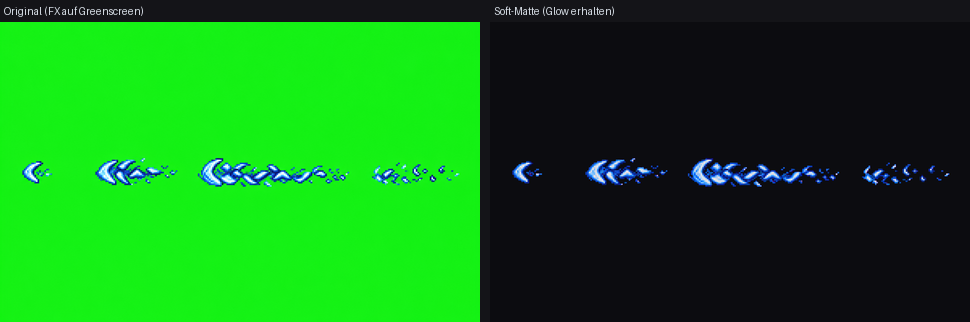
Soft matte instead of 0/1 alpha: the green screen is gone, the soft glow/translucency are preserved.
Related features
- Auto — measures the key per image and applies the same soft matte (mixed batch folders).
- Magenta FX / Water — the Sprite/FX profile for magenta-keyed water/effect assets.