
Auto
Measure the key per image and cut out with a soft matte — ideal for mixed green/magenta batch folders.
Summary
Auto measures the chroma key color per image and cuts it out with the same soft matte as FX / Glow — green, magenta, or custom. Images with no detectable key it passes through unchanged. That makes Auto the right call for mixed batch folders where different key colors are jumbled together.
When to use it
- You've got a batch folder with mixed keys (green and magenta) and you don't want to pick a profile per image.
- Some images in the folder have no key at all and should stay untouched.
- You want a soft, clean matte instead of a hard edge.
When not Auto:
- You need crisp, hard pixel-art edges → a Sprite profile (Green/Magenta Sprite). Auto does not guess Sprite-vs-FX.
- You only want to solve translucent effects cleanly and you know the case → FX / Glow (Soft Matte).
How it works
Auto measures the key from the image border (measured per image, not fixed up front) and checks whether there's a key at all (a saturation gate plus a sufficient key share, globally or at the edge).
- Key detected → the same FX soft matte is applied (fractional alpha + despill).
- No key → the image is passed through unchanged.
Auto deliberately doesn't guess Sprite-vs-FX: a measurement run over 41 labeled assets showed that soft area and edge thickness overlap completely — the best split threshold would be a coin toss. So the honest solution is: measure the key + universal soft matte + a safeguard for images with no key. For hard pixel-art edges, you pick a Sprite profile yourself.
Settings
Auto shares the sliders with FX / Glow (the key is measured, not set with the eyedropper):
| Slider | Effect |
|---|---|
| Matte mode | Soft (Glow) (default) or Hard (0/255) — the despill stays active in both. |
| Matte hardness | Key-relative background threshold (default 82, range 60–95). |
| Soft band | Foreground anchor below the key (default 10, range 0–60). |
| Despill strength | Off / Soft / Normal (default) / Strong — removes the key tint. |
| Color recovery | Unmultiply for a stronger result (default on). |
CLI / Automation
Headless for mixed batch loops — invocation and shared flags in the CLI overview. You pick
this profile with --profile auto; the key is measured per image (no --key-color).
Relevant flags (shares the soft matte with FX / Glow): --fx-matte-mode {soft,hard},
--fx-hardness 60–95 (default 82), --fx-softband 0–60 (default 10), --fx-despill {off,max,mean,min}
and --fx-recover / --no-fx-recover (Color recovery). --key-tolerance only bites on the auto-custom
key.
Example:
clean_sprite_chromakey.py mixed.png mixed_out.png --profile auto
FAQ
What happens to images with no key in the batch? They're passed through unchanged — Auto detects the absence of a key and doesn't touch the image.
Do I get hard pixel-art edges with it? No — Auto gives a soft matte. For crisp hard edges, pick a Sprite profile; Auto deliberately doesn't choose between Sprite and FX.
How is Auto different from "FX / Glow"? Technically both use the same soft matte. Auto measures the key per image and has a no-key passthrough — built for mixed batch folders. FX / Glow is the targeted single profile for translucent effects.
Limits
- Doesn't guess Sprite-vs-FX (shown to be non-separable by a measurement run).
- No manual key override (eyedropper) — the key is measured.
- Soft alpha — no hard pixel-art edges (Sprite profiles for that).
Examples
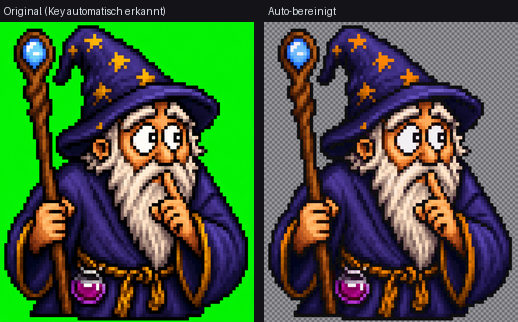
Auto measures the key per image and cuts out — robust for mixed folders.
Related features
- FX / Glow (Soft Matte) — the same matte process as a targeted single profile.
- Green Sprite — a hard pixel-art edge when Auto is too soft.