
Asset Slice (9-slice / 3-slice)
Bring UI panels, buttons and frames to any size distortion-free — corners stay fixed, edges and center scale.
Summary
Asset Slice splits an asset along four edge insets into up to 9 regions, and does two things with that: it can reassemble the asset distortion-free to any target resolution (9-slice / 9-patch) or export the regions individually. The four corners stay pixel-exact and fixed, the edges scale on one axis, the center on both.
When to use it
- You have a UI panel, a button or a frame and need it in several sizes — without the corners distorting.
- You want to break an asset into its edge and center regions and reuse them individually.
- A 3-slice is enough (stretchable horizontally only or vertically only) — that's the 9-slice case with one inset pair set to 0.
When not Asset Slice:
- You want to cut a sheet/atlas into any number of free cells → Asset SliceX.
- You want to cut out / reduce detail → chroma-key, or UnDetail/Pixelize.
How it works
From the source W × H and the four insets left/right/top/bottom, columns and rows are formed: fixed
corners, edges stretchable on one axis, a center stretchable on both axes (region names tl, t, tr, l,
c, r, bl, b, br). If an inset is 0, the matching column/row drops out — which gives the 3-slice case
automatically.
When scaling, the corners are set 1:1 and the edges/center are filled to the target dimensions — with two pixel-faithful fill modes:
- Tile (
tile, default): the region is repeated pixel-exact (last tile clipped) — no blurring, pixel-invariant. - Stretch (
stretch): the region is brought to the strip size via nearest-neighbor (the explicit, deliberate scaling exception).
Settings
| Slider | Effect |
|---|---|
| Preset | 9-slice · 3-slice horizontal · 3-slice vertical · Custom — sets sensible inset defaults. |
| Insets (left/right/top/bottom) | Distance of the cut lines from the four edges, in pixels. Live line overlay in the preview. |
| Fill mode | Tile (repeat pixel-exact, default) or Stretch (nearest-neighbor). |
| Target size | Toggle Pixel (width × height) or Factor (converted to target pixels before reassembly). |
| Output mode | Scale (one reassembled PNG) · Cut (regions individually) · Both. |
Recommended settings by use case:
| Goal | Recommendation |
|---|---|
| Pixel-art panel to a new size | 9-slice + Tile, target size in px |
| Horizontal bar/button | 3-slice horizontal (top/bottom = 0) |
| Reuse regions individually | Output: Cut (or Both) |
CLI / Automation
Headless, the same 9-slice — invocation and positional arguments in the CLI overview. You pick
this operation with --operation slice.
Relevant flags (mirroring the sliders above): the four insets --slice-left / --slice-right /
--slice-top / --slice-bottom (px), the target size --slice-target-width / --slice-target-height
or --slice-scale FACTOR, the fill mode --slice-fill {tile,stretch} and the output mode
--slice-output {scale,cut,both}.
Example:
clean_sprite_chromakey.py panel.png panel_out.png --operation slice --slice-left 16 --slice-right 16 --slice-top 16 --slice-bottom 16 --slice-target-width 256 --slice-target-height 128 --slice-fill tile --slice-output scale
FAQ
How do I make a 3-slice instead of a 9-slice? Set one opposite inset pair to 0 (or pick the matching preset). Then only one stretchable axis remains — the app drops the empty column/row automatically.
Do my pixels distort when scaling? In Tile mode they don't — the regions are repeated pixel-exact. Stretch uses nearest-neighbor (hard, no blurring). A soft interpolation deliberately doesn't exist.
What are the cut files named?
<name>_tl.png, _t.png, _tr.png, _l.png, _c.png, _r.png, _bl.png, _b.png, _br.png. Empty
regions are skipped.
Why do I get an error at a small target size?
When target width < left + right (or target height < top + bottom), the fixed corners no longer fit
— the app reports that as a clear error.
Limits
- Only the 4-inset 9-slice model — no free N×M grids (that's what Asset SliceX does).
- No visual line dragging in this version (numeric insets + live overlay).
- No blurring / no resampling when scaling — only tiling or nearest-neighbor.
Examples
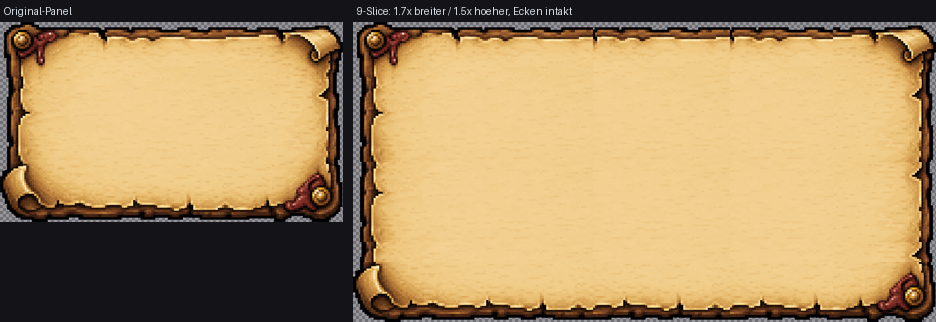
Same scale: corners stay undistorted, only edges/center are tiled — any target size.
Related features
- Asset SliceX — free grid cutting into any number of cells (without scaling).